
Bookmark this page for quick reference
Paper accumulates quietly throughout the year; statements arrive, receipts pile up, and documents get set aside to deal with later.
Once a year, working through all of it in one pass is the most efficient way to clear the backlog and make sure everything important ends up in the right place.
What This List Is For:
This checklist covers the annual process of sorting through a household’s accumulated paperwork: deciding what gets filed for the long term, what gets kept temporarily, and what gets shredded. It’s not a binder maintenance checklist; it is a document sorting and filing process.
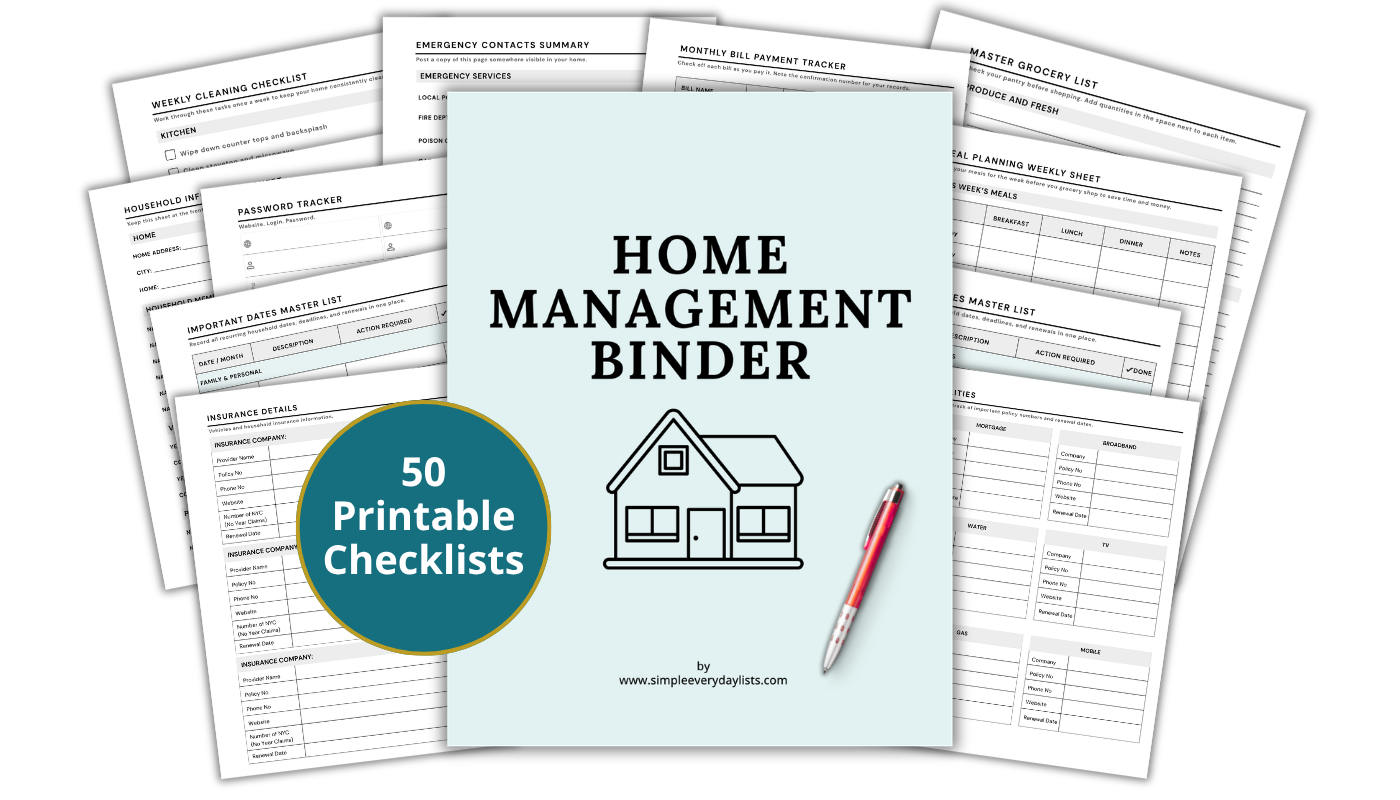
📄 The Home Management Binder includes a set of formatted reference pages designed to store the documents you decide to keep – organized by category and ready to print.
This post walks through four main areas: sorting documents by category, applying retention guidelines, deciding what gets filed versus stored versus shredded, and using a household binder to prevent the problem from recurring next year.
What Is A Household Binder?
A household binder is a single reference point for the lists and information you use repeatedly to manage your home. For a full overview of how the system works, visit our household binder guide.
Step 1: Gather Everything First
Before any sorting decisions are made, collect all loose paperwork from wherever it has landed over the past year.
Common locations include kitchen drawers, desk surfaces, filing trays, bags, and any inbox that hasn’t been cleared regularly.
Gather documents from:
- Kitchen catch-all drawers
- Desktop or home office inbox trays
- Bags, totes, or coat pockets
- Any folder labeled “to deal with”
- Email inboxes, if you print and store digital statements
- Boxes or bins used as temporary holding spots
Do not sort as you go during this step; the goal is simply to get everything into one place before any decisions are made.
Step 2: Sort Into Categories
Once everything is gathered, sort the pile into broad document categories before applying any retention rules.
This makes the next step significantly faster and prevents repeated decision-making on similar document types.
Sort into the following categories:
- Tax documents: W-2s, 1099s, charitable donation receipts, and deductible expense records
- Insurance: Policy documents, explanation of benefits, claim records
- Medical: Bills, test results, vaccination records, prescription information
- Home: Mortgage or lease documents, repair invoices, permit records, warranty paperwork
- Financial: Bank statements, loan documents, investment statements, credit card records
- Vehicle: Title, registration, insurance, service and repair records
- Legal and identity: Birth certificates, Social Security cards, passports, wills, powers of attorney
- Warranties and manuals: Appliance documentation, electronics, tools
- Miscellaneous receipts: Purchases, returns, work-related expenses
Set aside anything that is clearly junk mail or already outdated before moving to retention decisions.
Step 3: Apply Retention Guidelines
Once documents are sorted by category, the next step is deciding how long each type needs to be kept.
General retention rules apply to most households, though individual circumstances, such as self-employment or ongoing legal matters, may require longer retention periods.
Want a Ready-Made Version?
The Home Management Binder is a 50-page printable system covering every area of your household — bills, contacts, seasonal tasks, and more. Print once, use for years.
Learn more about the binder...Retention guidelines by category:
- Tax returns and supporting documents: Keep for 7 years; the IRS generally has 3 years to audit a return, but 6 years applies in cases of significant underreporting
- Bank and credit card statements: Keep for 1 year unless needed for tax purposes, in which case retain for 7 years
- Pay stubs: Keep until reconciled with your annual W-2, then discard
- Investment and retirement statements: Keep annual summaries for 7 years; discard monthly or quarterly statements once the annual summary arrives
- Insurance policies: Keep current policy documents; discard expired policies once renewed unless a claim is still open
- Medical records and bills: Keep for 5 years after treatment; keep vaccination records and major health history permanently
- Home purchase and mortgage documents: Keep for the life of the loan plus 7 years after sale
- Repair and improvement receipts: Keep for as long as you own the home; relevant to capital gains calculations when selling
- Vehicle title and loan documents: Keep for the life of ownership plus 3 years after sale
- Warranties and manuals: Keep for the life of the item
- Legal documents: Keep permanently (wills, birth certificates, Social Security cards, passports, marriage and divorce records)
- Receipts for everyday purchases: Discard after the return window closes unless needed for warranty or tax purposes
When in doubt, keeping a document for one additional year beyond the guideline is a reasonable default.
Step 4: Decide Where Each Document Lives
Once retention decisions are made, documents fall into one of three destinations: the active household binder, long-term storage, or the shred pile.
Active Binder: Documents referenced regularly or needed quickly. This includes current insurance summaries, medical information, emergency contacts, active warranties, and vehicle records.
These are the pages that need to be findable on short notice.
Long-Term Storage: Documents kept for compliance or legal reasons but rarely accessed. Tax returns, closed loan documents, historical medical records, and home improvement receipts belong here.
A dedicated filing box or drawer works well for this category.
Shred: Anything containing personal information that no longer needs to be retained. This includes old bank statements outside the retention window, expired insurance policies, outdated pay stubs, and superseded legal documents.
Do not discard documents with personal information in the recycling bin without shredding.
A cross-cut shredder handles most household document disposal needs.
Step 5: Set Up a Household Binder for Next Year
The reason paperwork accumulates into an annual sorting project is usually the absence of a consistent filing system during the year.
A household binder solves this by giving every category of document a designated place to land as it arrives.
Setting up a binder after completing this checklist means that next year’s sorting process is significantly smaller; most documents will already be in the right place.
The binder functions as the active layer of the system, while long-term storage handles the archive.
Key sections to include:
- Insurance reference pages
- Medical information and records
- Home and vehicle documents
- Financial account reference list
- Active warranties and manuals
- Emergency contact and household information pages
For a full overview of how to build and structure a household binder, visit our household binder guide.
Practical Notes
This checklist works best when completed once per year, either in January after tax documents begin arriving or in December before the new year begins.
Either timing works; consistency matters more than the specific month.
In households with two adults, it is worth deciding in advance who is responsible for each document category to avoid duplication or gaps.
Some households split responsibility by category – one person handles financial and tax documents, the other handles medical and insurance – while others complete the full sort together.
Digital documents follow the same retention guidelines as paper.
If your household stores statements and records electronically, applying the same category and retention framework to your digital filing system keeps both sides of the process consistent.
Closing
An annual paperwork sort is a single, contained process that keeps household documents accurate, accessible, and appropriately retained.
Working through it once a year prevents accumulation and ensures that important records are in the right place when they are needed.
If you’d prefer a ready-made version, the printable Home Management Binder includes formatted reference pages for the active documents identified in this checklist, organized by section and ready to print.
Ready to set up the full system?
The Home Management Binder includes 50 formatted, print-ready checklists covering household finances, contacts, seasonal tasks, and everything in between - organized and ready to use.
Learn more about the Home Management Binder